Since starting to work after graduation, it has been hard to maintain a good and healthy lifestyle: everyday I spent most of time sitting in front of my screen without much movement. I was so tired after work that I rewarded myself with good food (of oversized portion) and stayed in bed playing with my iPad. As expected, the weight shoots up. So I was looking for ways to get back to the right track.
Then I signed up for the gym and did some workout before work everyday. However, as many others, it is hard to keep motivated and sometimes I just doubt whether it works. I started searching for some tips to stay motivated, then I found this small piece: UP by Jawbone.
A fitness gadget isn't something new. You may have heard of Nike's FuelBand. It calculates the steps and movement you made and rewards you with Nikefuel, a score that is similar to the concept of calories but god knows what the score means and how that is derived. And that is exactly why I didn't choose Nike+ FuelBand despite its really cool look. It doesn't do much in fitness aspect.
Design

Then UP designed by Jawbone popped out. It is a wristband with minimal design. To be honest, nobody would notice that is a piece of gadget if I don't mention it. It is just like one of the rubber bands we used to wear in high school. The package is simple as well, just the wristband itself and a charging USB adaptor.
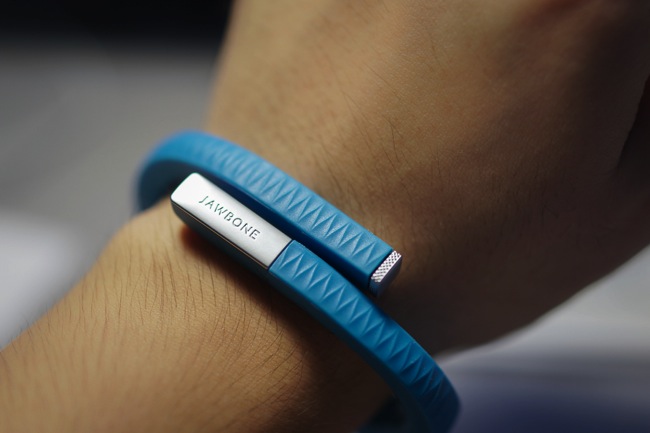
The wristband comes naturally in shape, with two ends overlapping. It comes with three different sizes and eight different colours. However, because it only hits Singapore market in April, I only found two colours are available at the moment: black and blue. I chose the medium size of the blue band. It is slightly bigger than my wrist but acceptable. First time I wore it, I felt a bit strange but soon it became just like a watch or bracelet, not annoying at all.
UP is splash-proof, so you don't have to take it off when you are showering. However, Jawbone suggests taking it off when swimming. It's kind of disappointing since I was about to record how much calories I burned during swimming.
Functions

The band itself doesn't contribute to the whole user experience. The UP app plays a critical role in the use of the wristband. The app can be downloaded from iOS App Store and its latest development has included support for Android platform. For the first time using UP, it needs to be connected to the app to set up details like gender, height, weight and birthday. It also has instructions of how to play with the band.
UP wristband has two major functions: record number of steps you take and track the sleep. You can set a daily goal for your steps and sleeping hours. The default setting will be based on your age and other details. For me, it's 10000 steps and 8 hours of sleep.

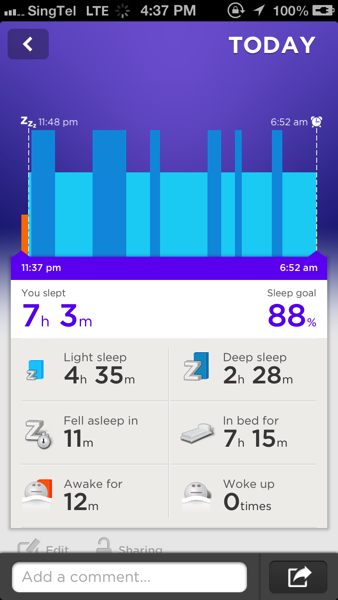
Recording steps is pretty simple, as long as you are moving, it will record down that. Tracking the sleep requires switching the band into sleep mode by long pressing the button on the tip of the band. The precision motion sensor will detect whether one is deep sleep or light sleep according to the micro-motion. I find it quite accurate because I remembered I woke up a few times in the evening and they were indeed shown in the record.
Other useful functions include smart alarm, you can set a wake-up time and the wristband will vibrate 10 minutes before that to wake you from deep sleep. It helps you get up easier. Also you can set an 'idle alarm' in the daytime. When UP notices that you haven't been moving for a period time, it will vibrate to remind you to walk around. This is really helpful when I am working in the office. It keeps me aware of how much time I have spent at my desk so that I will stand up and stretch a little bit.
Additionally, you can log the food in the UP app to keep track of how much calories you consume everyday. You can either search, scan the barcode or take a picture of the food and add in details later. But I find it less convenient as many Asian local delights are not recorded in the database.

After a few days, when UP collects enough data, it starts to generate trend and help get insights in your daily activity, like whether you have enough deep sleep or how to take more steps. It is all small tricks but they do keep me motivated. (Oops, I seem to be moving less with eating more. Bad sign. :( )
UP also has its social aspect. You can share your daily result with friends on Facebook and Twitter. More importantly, you can add friends who also use UP in the section Team. So that you can see and compare the results with each other to stay motivated.
UP's battery lasts about 10 days and you need to charge it using the USB adapter. It takes about 80 minutes to get a full charge. I am quite happy with the battery performance.
However, as you may already have noticed. the wristband doesn't come with bluetooth. The sync between UP and its app needs to be done via the audio jack. It could be tedious to take the band on and off the wrist. Jawbone also recommends to sync it twice a day. I usually do it once after getting up and the other before I go to bed. I sometimes also sync the band after lunch just to check whether I can reach my goal today.
Verdict
So far I have been really enjoying UP by Jawbone and had a very regular exercise everyday.
Good things: Simple design makes it suitable for everyone. Compared to Nike's FuelBand, sleep tracking is a huge bonus and also the smart alarm helps getting out of bed easier. The design of the app is intuitive and has lots of functions. It is really a perfect companion for the band.
Bad things (or things that I think should be improved): The band is not suitable for wearing in swimming pool, which is less helpful in tracking exercise. Moreover, it doesn't support bluetooth so you have to constantly take off the band. Also, lack of any display on the band means that you cannot access the real-time data easily. In addition, the food log could be improved by including more Asian food to make it more useful.
The UP wristband isn't cheap, but not as pricey as Nike's FuelBand. It also has more functions to keep your lifestyle healthy. So I would still recommend this to my friends who are interested in achieving their fitness goals!
Technorati Tags: Accessory, App, Fitness, Hands-on, Review, UP by Jawbone


