Pages

Showing posts with label Apps. Show all posts

Thursday, April 4, 2013

Stay Organized! iOS App Mailbox First Impression

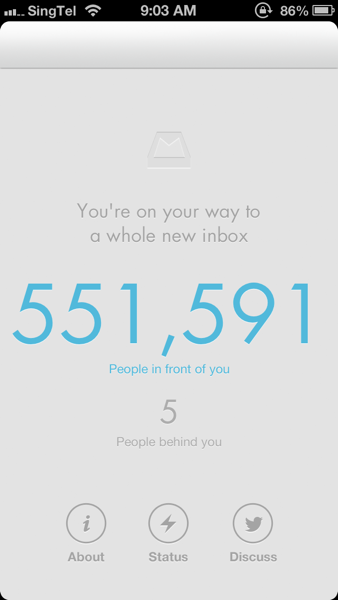
I believe most iPhone users like me are using the built-in Mail app for email messaging. It's convenient and rather intuitive and we can check all the email accounts at one go. Weeks ago, a friend of mine recommended me to try out the Mailbox app. I tried and downloaded the app. It turns out that because of the overwhelming demand, the service provider is struggling to catch up in capacity. They set up a reservation queue to curb the requests. Below is what I've got when I first made a reservation.

2013 03 17 09 02 352013 03 17 09 03 22

Tuesday, March 26, 2013

Moleskine App: Put Your Favourite Notes in Digital

DSC07023

If you are a person who likes taking notes, you would not miss the name of Moleskine. Moleskine notebooks have the classic hardcover with the elastic band attached. The notebook is the perfect companion for daily inspiration. Now it brings the same experience from the traditional paper notebook to a whole new digital form, the Moleskine Journal iOS app. 

The Moleskine app has iPhone and iPad version, but the experience of its iPhone version is rather limited, like other note apps, since the screen is small. The iPad version is much better, even on iPad mini.

Sunday, March 17, 2013

BigWebStats: Check Out How Well Your Website Performs

As a blogger who runs a website from day to day, monitoring the traffic and other statistics of the blog is essential for me. I personally use Google Analytics for this purpose, as most of other bloggers do. However, I was asked to give a try on this web service: BigWebStats. So I had a look on it and it is pretty easy and great to use!

The website interface is clear. All you have to do is to input the URL you are interested in: it could be your own website, or any website you want to check out the performance. 

Screen Shot 2013 03 17 at 9 10 47 AM

Saturday, March 2, 2013

Typesetter: Add Text to Your Photos

If you are obsessed with sharing photos on the go , you may sometimes find yourself in the need of adding text to the photo. Today I am introducing a great app that helps you on this. It is called 'Typesetter'.

The functionality of this app is straightforward, adding text on the photo. It provides some customization so that your ordinary photo could turn into some really artistic piece of work! Oh did I mention that it's free of charge? 

 2013 03 02 18 00 01

Upon the launch screen, you could see a few sample photos that this app has produced. You can opt for taking a new photo or choosing an existing one to start your workflow.

Wednesday, January 30, 2013

Vine: Twitter's Instagram in Video Space

2013 01 29 16 12 26

Twitter launched its new social network app, Vine a few days ago. Probably you don't know what it is judging by its name and that’s what this post is for: give you a general idea on how this new social app works.It’s very much like Instagram, if you have ever used it. Instead of still pictures, users upload videos and they are of fixed duration, 6 seconds. That would be boring if it’s just a 6-second video without any fun part. It actually can be composed of many parts, like a mini film.

Friday, January 18, 2013

Life Is about Running - Temple Run 2 Brief Review

2013 01 17 20 03 10

If you are an iOS user for some time, you may at least know the name, Temple Run. It's a very popular game and has been on the top charts for many times. The game is rather simple but addictive. Once you learn how to play, you don't need your brain when you are playing. And now, the developer of this game, Imangi Studios, launches their latest product, Temple Run 2 (and it just hits 1st in the top chart of free app when this blog is posted!).

Monday, April 2, 2012

Combine Your Photos into Frames to Get a Better Look! - Introducing the App 'PicFrame'

Good morning everyone! It's Monday again. :( Hope you have had a great weekend spent with your family and friends! Oh, you got many photos about this weekend to share on Facebook and they are just too many to upload? Here is a small handy app that saves you out of this!

Screen Shot 2012 04 02 at 10 29 51 AM

PicFrame is a small app that helps you to organize and combine your photo into frames so that it looks nicer and you also avoid uploading a huge pile of photos to Facebook or Flickr. It is both available on Mac and iOS devices. I personally use the Mac version of it but I guess many users would prefer the mobile version as they usually upload the photos on the go.

Screen Shot 2012 04 02 at 10 32 26 AM

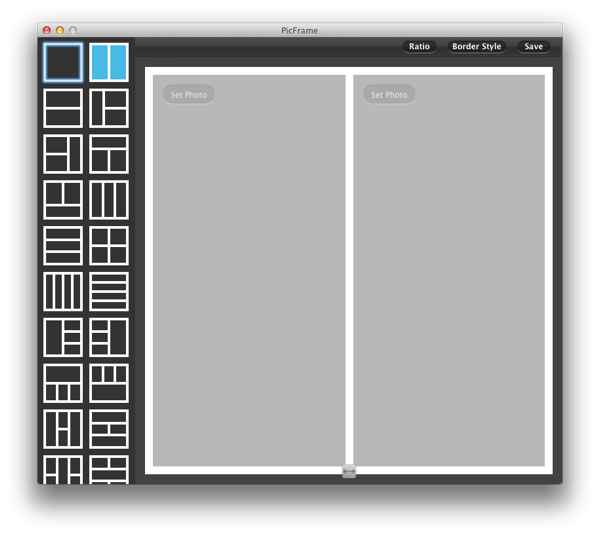
↑After launching the app, this is the first panel you will see. On the left side is the frame templates you can choose from, in total 34 different kinds of frames and it supports up to 5 photos in a single frame.

Saturday, March 31, 2012

Organize Your Notes in an Aesthetic Way! - Hands-on of iOS app 'Paper'

Many of us nowadays have a tablet, either just for fun or for getting some serious work done. iPad from Apple is for sure the most popular choice for a tablet. I personally own an iPad 2 and I have enjoyed every bit of it. I use it for some casual readings before going to bed and sometimes for reading the lecture notes if I forgot to print. On the airplane, I can play some small lovely games to kill my time. Many people use iPad as a traditional notepad as well, for keeping their life organized. There are many apps out there that could simulate quite well like a real notepad. Today, I am going to introduce one of them, which is called "Paper".


IMG 0144

One thing I like about Paper is that besides the regular features that other similar apps have, it has a more uniquely designed interface, which makes the note drawing more pleasant. Oh, did I mention that this app is free?